Fix "Could Not Delete User Due to Legal Hold"
Workspace blocks deleting a user whose data is on a Vault hold. Here's why the error appears, how to find the hold, and when not to delete the user at all.
Overdrive Team7 min read
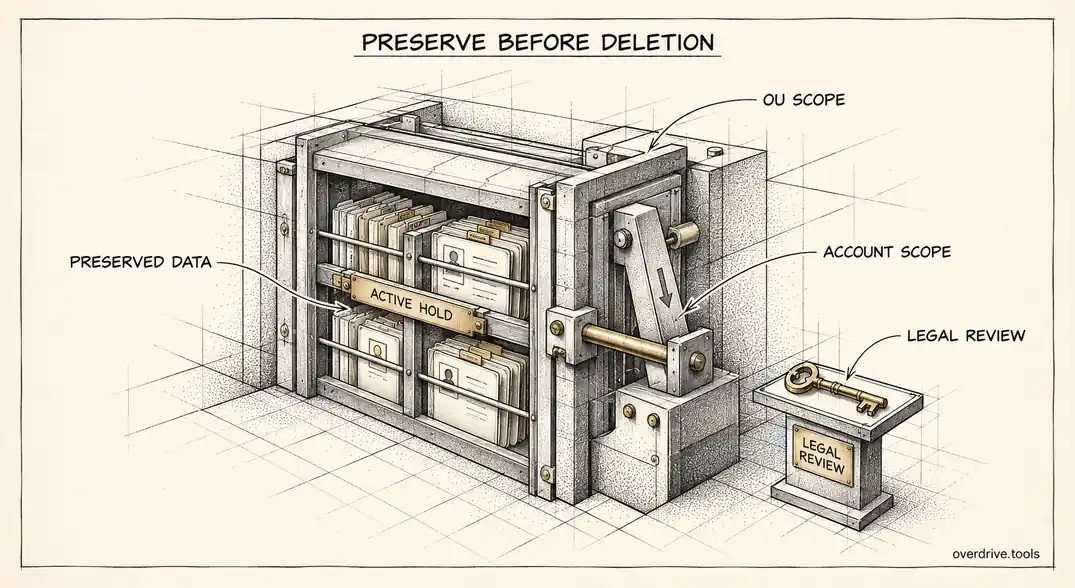
If Google Workspace refuses to delete a user with a message like "Could not delete user due to legal hold. Please contact your Vault administrator," the account is inside the scope of a Google Vault hold. Google blocks deletion deliberately, because deleting the account would destroy data your organization has committed to preserve. The fix is either to release the user from the hold, which is a legal decision rather than a technical one, or to stop trying to delete the account and preserve it another way.
A related message, "Could not transfer data for user on legal hold," appears when you try to move a held user's data during offboarding. The cause is the same. Here's how to find the hold, decide what to do, and avoid the most common trap, which is a hold that covers far more accounts than anyone intended.
Why Google blocks the deletion
A Vault hold preserves data indefinitely, regardless of what users or retention rules would otherwise delete. Holds are usually created because of litigation, an investigation, or a regulatory obligation, and while one is active, the organization may be legally required to keep the data intact.
Deleting a user account removes its data from Vault's protection. Google is explicit that once an account is deleted, holds and retention rules no longer apply to it and its data can be purged, even if the account is later restored. Blocking the deletion is a guardrail against accidentally destroying evidence.
That's why the error tells you to contact your Vault administrator. The person deleting accounts and the person managing holds are often different people, and the right answer depends on the matter the hold belongs to.
Two kinds of holds
Holds in Vault can be placed in two ways, and you need to check both.
Account-based holds name specific users. If the departing user was named in a matter, their account is on hold directly.
Organizational unit holds cover every account in an organizational unit. If the user sits in an OU that's on hold, or under a parent OU that's on hold, the user is covered even if nobody ever named them.
The second kind causes most of the confusion. A hold placed on the top-level organizational unit with an "All accounts" scope covers everyone in the company, which means no account anywhere can be deleted. Google strongly recommends against selecting the top organizational unit for exactly this reason. If every deletion in your domain fails with the legal hold error, that's almost certainly what's happened.
A hold also blocks deletion even when none of the user's data matches the hold's search terms. Being in scope is enough.
How to find the hold
Here's the sequence to locate what's blocking you.
Step 1: Check account-based holds
In Vault, open Reports, then User Holds, and search for the user. The report lists each hold that names the account and the matter it belongs to. An administrator with the right Vault privileges, typically including the ability to manage holds and view all matters, can release the account from each hold here, once that's been approved.
Step 2: Check organizational unit holds
In the Admin console, note the user's organizational unit and every parent above it. Then in Vault, review holds scoped to organizational units, looking for any that cover those units, including the top level.
Step 3: Talk to whoever owns the matter
Before releasing anything, confirm with legal or whoever created the matter whether this person's data must still be preserved. Releasing a hold that's still needed can have real consequences, and the person who hit the error rarely has the context to decide.
Your options once you know
Here's how the decision usually plays out.
Option 1: Keep the account and preserve it properly
If the data must stay on hold, don't delete the account. Google recommends switching the user to an Archived User license, which preserves their Workspace data in Google storage, keeps it under the hold, and blocks the person from signing in, at a lower cost than a full license. For most departures involving active matters, this is the correct outcome rather than a workaround.
Option 2: Export, then release and delete
If the data must be preserved but not necessarily inside Google, export it from Vault, store the export according to your legal team's instructions, then release the user from the hold and delete the account.
Option 3: Move the user out of a held OU
If the user is only covered because of an organizational unit hold that shouldn't apply to them, move their account to an OU that isn't on hold. For holds on the top-level OU, the longer-term fix is to rescope them so they cover only the units with people who actually need to be held, leaving at least one unit free for routine offboarding.
Option 4: Release and delete
If legal confirms the hold no longer needs to cover this user, release the account from each hold, then delete it.
After any change to holds or organizational units, wait. Google advises allowing 24 to 48 hours for Directory and Vault settings to fully update before retrying the deletion. Many "it still doesn't work" reports are simply retries made too soon. Keep the user suspended while you wait, so nothing changes in the meantime.
Before you delete anything
Even when the hold is cleared, deletion is worth slowing down for. Remember that deleted accounts can be restored for about 20 days, but data that was marked for deletion is no longer protected by holds or retention and can be purged during that time, and it can't be recovered even if you restore the account.
Take care of the Drive side before the account goes. Transfer files the user owned, including unshared files, to a manager or a shared drive, and review what they had shared outside the company, since transferred files keep their existing sharing. Overdrive for Google Workspace connects with read-only access and flags files owned by suspended users that are still exposed to people outside the organization, so you can clean up a held or departing user's external shares even while their account stays preserved. It reads metadata only, never file contents.
Who should be involved
This error sits at the boundary between IT and legal, which is why it tends to stall. A clear split of responsibilities keeps it moving.
The admin handling the departure owns the mechanics: identifying which holds cover the account, suspending the user in the meantime, and executing whatever is decided. Legal, or whoever created the matter, owns the decision about whether the data must be preserved. Finance has an interest too, since an Archived User license costs less than a full license but more than a deleted account.
Agree in advance who the Vault contact is. The error message tells the admin to contact the Vault administrator, and in many organizations nobody is sure who that is. Naming the person in your offboarding documentation saves days.
Preventing the error next time
Most legal hold errors in routine offboarding come from holds that were scoped too broadly years ago and never revisited. A short review prevents most of them.
List every active matter and hold, and check which ones are still needed. Old matters are often left open long after the issue was resolved. Rescope any hold on the top-level organizational unit so it covers only the units that need it. And add a step to your offboarding checklist that checks Vault before attempting deletion, so the person offboarding knows in advance whether a user is held, rather than discovering it through an error.
Finally, make holds visible to the people who offboard. If the admin team can see at a glance which accounts are held, the error stops being a surprise and becomes a known step in the process.
It also helps to agree a default: departing users covered by an active hold move to Archived User licenses automatically, with legal informed, instead of each case becoming a negotiation.
The short version
"Could not delete user due to legal hold" means the account is within the scope of a Google Vault hold, either named directly or covered through its organizational unit, and Google blocks deletion to protect data you may be required to keep. Check Vault's User Holds report and any holds on the user's OU and its parents, especially the top level, then confirm with legal before changing anything. If the data must be kept, switch the user to an Archived User license instead of deleting. Otherwise export if needed, release the hold or move the user out of the held OU, wait 24 to 48 hours, and retry.
Related Articles
- Google Vault and Drive: What Admins Need to Know
- What Happens to Shared Files When an Employee Leaves Your Workspace
- How to Reclaim Unused Google Workspace Licenses